
Project Management Software - Page 52
Project Management Software is indispensable for organisations aiming to deliver projects on time and within budget. Project management software provides tools for planning, scheduling, resource allocation, and risk management, ensuring that projects are executed efficiently. Project tracking software enables teams to monitor progress, identify bottlenecks, and make data-driven decisions. PMO software (Project Management Office) offers a centralised platform for managing multiple projects, ensuring alignment with organisational goals and standards. Program management software provides a holistic view of project portfolios, enabling organisations to prioritise initiatives and optimise resource utilisation. These solutions are designed to enhance collaboration, improve communication, and ensure project success. Discover the best project management software tailored to meet the needs of your organisation in Australia. Read more Read less


Features
- Milestone Tracking
- Time & Expense Tracking
- Issue Management
- Billing & Invoicing
- Gantt/Timeline View
- Kanban Board
- File Sharing
- Prioritization
- Resource Management
- Budget Management
- Document Management
- Multiple Projects

Features
- Milestone Tracking
- Time & Expense Tracking
- Issue Management
- Billing & Invoicing
- Gantt/Timeline View
- Kanban Board
- File Sharing
- Prioritization
- Resource Management
- Budget Management
- Document Management
- Multiple Projects

Features
- Milestone Tracking
- Time & Expense Tracking
- Issue Management
- Billing & Invoicing
- Gantt/Timeline View
- Kanban Board
- File Sharing
- Prioritization
- Resource Management
- Budget Management
- Document Management
- Multiple Projects

Features
- Milestone Tracking
- Time & Expense Tracking
- Issue Management
- Billing & Invoicing
- Gantt/Timeline View
- Kanban Board
- File Sharing
- Prioritization
- Resource Management
- Budget Management
- Document Management
- Multiple Projects

Features
- Milestone Tracking
- Time & Expense Tracking
- Issue Management
- Billing & Invoicing
- Gantt/Timeline View
- Kanban Board
- File Sharing
- Prioritization
- Resource Management
- Budget Management
- Document Management
- Multiple Projects

Features
- Milestone Tracking
- Time & Expense Tracking
- Issue Management
- Billing & Invoicing
- Gantt/Timeline View
- Kanban Board
- File Sharing
- Prioritization
- Resource Management
- Budget Management
- Document Management
- Multiple Projects

Features
- Milestone Tracking
- Time & Expense Tracking
- Issue Management
- Billing & Invoicing
- Gantt/Timeline View
- Kanban Board
- File Sharing
- Prioritization
- Resource Management
- Budget Management
- Document Management
- Multiple Projects

Features
- Milestone Tracking
- Time & Expense Tracking
- Issue Management
- Billing & Invoicing
- Gantt/Timeline View
- Kanban Board
- File Sharing
- Prioritization
- Resource Management
- Budget Management
- Document Management
- Multiple Projects

Features
- Milestone Tracking
- Time & Expense Tracking
- Issue Management
- Billing & Invoicing
- Gantt/Timeline View
- Kanban Board
- File Sharing
- Prioritization
- Resource Management
- Budget Management
- Document Management
- Multiple Projects

Features
- Milestone Tracking
- Time & Expense Tracking
- Issue Management
- Billing & Invoicing
- Gantt/Timeline View
- Kanban Board
- File Sharing
- Prioritization
- Resource Management
- Budget Management
- Document Management
- Multiple Projects

Features
- Milestone Tracking
- Time & Expense Tracking
- Issue Management
- Billing & Invoicing
- Gantt/Timeline View
- Kanban Board
- File Sharing
- Prioritization
- Resource Management
- Budget Management
- Document Management
- Multiple Projects

Features
- Milestone Tracking
- Time & Expense Tracking
- Issue Management
- Billing & Invoicing
- Gantt/Timeline View
- Kanban Board
- File Sharing
- Prioritization
- Resource Management
- Budget Management
- Document Management
- Multiple Projects

Features
- Milestone Tracking
- Time & Expense Tracking
- Issue Management
- Billing & Invoicing
- Gantt/Timeline View
- Kanban Board
- File Sharing
- Prioritization
- Resource Management
- Budget Management
- Document Management
- Multiple Projects

Features
- Milestone Tracking
- Time & Expense Tracking
- Issue Management
- Billing & Invoicing
- Gantt/Timeline View
- Kanban Board
- File Sharing
- Prioritization
- Resource Management
- Budget Management
- Document Management
- Multiple Projects

Features
- Milestone Tracking
- Time & Expense Tracking
- Issue Management
- Billing & Invoicing
- Gantt/Timeline View
- Kanban Board
- File Sharing
- Prioritization
- Resource Management
- Budget Management
- Document Management
- Multiple Projects

Features
- Milestone Tracking
- Time & Expense Tracking
- Issue Management
- Billing & Invoicing
- Gantt/Timeline View
- Kanban Board
- File Sharing
- Prioritization
- Resource Management
- Budget Management
- Document Management
- Multiple Projects

Features
- Milestone Tracking
- Time & Expense Tracking
- Issue Management
- Billing & Invoicing
- Gantt/Timeline View
- Kanban Board
- File Sharing
- Prioritization
- Resource Management
- Budget Management
- Document Management
- Multiple Projects

Features
- Milestone Tracking
- Time & Expense Tracking
- Issue Management
- Billing & Invoicing
- Gantt/Timeline View
- Kanban Board
- File Sharing
- Prioritization
- Resource Management
- Budget Management
- Document Management
- Multiple Projects

Features
- Milestone Tracking
- Time & Expense Tracking
- Issue Management
- Billing & Invoicing
- Gantt/Timeline View
- Kanban Board
- File Sharing
- Prioritization
- Resource Management
- Budget Management
- Document Management
- Multiple Projects

Features
- Milestone Tracking
- Time & Expense Tracking
- Issue Management
- Billing & Invoicing
- Gantt/Timeline View
- Kanban Board
- File Sharing
- Prioritization
- Resource Management
- Budget Management
- Document Management
- Multiple Projects

Features
- Milestone Tracking
- Time & Expense Tracking
- Issue Management
- Billing & Invoicing
- Gantt/Timeline View
- Kanban Board
- File Sharing
- Prioritization
- Resource Management
- Budget Management
- Document Management
- Multiple Projects

Features
- Milestone Tracking
- Time & Expense Tracking
- Issue Management
- Billing & Invoicing
- Gantt/Timeline View
- Kanban Board
- File Sharing
- Prioritization
- Resource Management
- Budget Management
- Document Management
- Multiple Projects

Features
- Milestone Tracking
- Time & Expense Tracking
- Issue Management
- Billing & Invoicing
- Gantt/Timeline View
- Kanban Board
- File Sharing
- Prioritization
- Resource Management
- Budget Management
- Document Management
- Multiple Projects

Features
- Milestone Tracking
- Time & Expense Tracking
- Issue Management
- Billing & Invoicing
- Gantt/Timeline View
- Kanban Board
- File Sharing
- Prioritization
- Resource Management
- Budget Management
- Document Management
- Multiple Projects

Features
- Milestone Tracking
- Time & Expense Tracking
- Issue Management
- Billing & Invoicing
- Gantt/Timeline View
- Kanban Board
- File Sharing
- Prioritization
- Resource Management
- Budget Management
- Document Management
- Multiple Projects
Project Management Software Buyers Guide
Table of Contents
Essential project management software buying information
Project management software helps businesses plan, organise, and manage multiple projects, such as marketing campaigns, events, product and software releases, and construction projects. The software provides features to allocate tasks to individual contributors and teams, create project workflows, collaborate with team members, and reporting to track project and task progress.
Project managers and team members are the main users of project management tools. Unofficial or informal project managers, such as construction managers or marketing agents, also coordinate project work.
Most project management software solutions on the market are priced "per month", and their entry-level pricing plans range from $7 (approx. 11 AUD) to $1,500 (approx. 2,309 AUD) per month.[1]
First-time buyers should begin evaluating options with a budget, number of users, specific use cases, and necessary integrations in mind. Partner with stakeholders on a list of important questions for vendors to help you evaluate their systems based on your needs, such as:
- Which project management tasks can this system automate?
- How can we use this tool’s dashboards to better visualise and track the status of projects?
- How does this tool support our project management methodologies (e.g., agile, waterfall)?
- What technical support will I need from the project management software provider?
- Does this tool use artificial intelligence to generate status reports and/or enhanced resource planning? If so, how?
Hussain Bandukwala[2], a project management office (PMO) consultant and PM instructor who’s trained more than 100,000 professionals, says a question that “really stumps” many companies is how different license types within a product work.
“With the advent of software as a service [models], you have different user-based license types,” he says. “So it’s important to understand what each license type gives you, plus their cost and limitations.”
What are the best project management tools?
According to our research, Notion is among the best-rated in the category, with a 4.72 out of 5 rating from over 2,584 verified user reviews from the past 2 years.
It is recognised for its versatility as an all-in-one workspace, combining note-taking, task management, databases, and collaboration tools. Users highlight its intuitive drag-and-drop interface, real-time collaboration, cross-platform access, and extensive customisation options. Notion supports various workflows for individuals and teams, offering templates, integrations, and flexible permission controls to centralise information and streamline organisation.
The main features are:
- Notes Management: Notion users value its versatile note-taking with rich formatting, easy organisation, linking, and multimedia embedding, though some find setup time-consuming and desire more customisation.
- Knowledge Base Management: Reviewers highlight Notion’s flexible structure, powerful search, easy linking, and media support for organising company or personal knowledge, but note versioning and structure setup can be challenging.
- Project Planning/Scheduling: Users appreciate customisable views (calendar, Kanban, Gantt), templates, and real-time collaboration, with integrations like Google Calendar and Figma, though some find advanced scheduling less robust than dedicated tools.
- Task Editing: Notion users find task editing intuitive, real-time, and highly customisable with drag-and-drop, status updates, and comments, but mention occasional syncing delays and minor usability quirks.
- Task Management: Reviewers of Notion value its flexible, customisable task lists, Kanban boards, and assignment features, though some miss automation and calendar sync and find the setup complex for advanced needs.
- Collaboration Tools: Users highlight real-time editing, easy sharing, comments, and permissions for teamwork, but note free plan limits, extra costs, and desire for richer in-app communication features.
What is project management software?
Project management tools are designed to automate task assignment, resource allocation, and milestone tracking for all project phases. They help create, assign, and track project work with features such as task management, project status report generation, budget tracking, and timeline tracking. Project management tools also help create resource allocation reports, identifying resource overloads, imbalances, and availability constraints, allowing project managers to optimise resource allocation.
Project management software is related to the more robust project portfolio management software and general-use tools, including collaboration software and task management software. Gartner reports that over 85% of businesses actively use project management software, and the market is expected to reach a valuation of $7 million (approx. 11 million AUD) by 2026.[3]
On Capterra, 1,764 different project management products and 23,021 user reviews for these products have been added since September 2023 alone.[4]
Project management software pricing
Tools for managing projects typically follow a subscription model, billed monthly. Entry-level plans, generally available for around $200 (approx. 308 AUD) per month, offer essential tools such as task management, project planning and scheduling, tracking, and collaboration capabilities.
For more robust needs, advanced plans are available at approximately $1,400 (approx. 2,155 AUD) per month. These include the foundational features and offer enhanced functionalities like advanced analytics, custom integration capabilities, and prioritised customer support, designed to cater to more complex project demands.
Over the past two years, our advisors have found that most (57%) of project management software buyers are setting their budgets within the range of $20 (approx. 31 AUD) to $40 (approx 62 AUD) per month.[5]
First-time buyers must note that initial expenses often include implementation, data migration, and customisation costs, while ongoing expenditures typically cover maintenance and support services. These factors are crucial to consider for a comprehensive understanding of the total cost of ownership.
Project management application features rated by users
All project management software tools include task management, project planning/scheduling, and reporting/project tracking features. And most systems share common features such as prioritisation, billing and invoicing, and managing multiple projects.
Core project management app features
- Task management: Create tasks, track progress status and completion percentage and view any associated notes or comments. 91% rate this feature as critical or highly important.
- Project planning and scheduling: Create project plans, define project objectives, set milestones, and establish project timelines. 91% rate this feature as critical or highly important.
- Reporting/project tracking: Generate various reports and performance metrics to track progress, analyse data, and gain insights into project health and team performance. 84% rate this feature as highly important and critical.
- Collaboration tools: Provide a channel for team members to share media files, communicate, and work together. 80% rate this feature as highly important and critical.
Highly rated common project management software features
- Multiple projects: Ability to track and manage several projects simultaneously. 90% rate this feature as critical or highly important.
- Prioritisation: Arrange activities and tasks based on their relative importance or urgency to complete. 85% rate this feature as critical or highly important.
- File sharing: Public or private sharing of digital files in various formats, such as documents, audio/video, images and more. 80% rate this feature as critical or highly important.
- Access controls and permissions: Define authorisation levels for access to specific files or systems. 79% rate this feature as critical or highly important.
- Billing and invoicing: Create, manage, and send invoices or bills to customers. 67% rate this feature as critical or highly important.
Buyers should remember that just because one product has more features than another doesn’t make it better for their business. Focus on how well a given system performs the key functions your team will use it for, rather than putting too much value on bonus features that may not make a big difference.
“If you don’t know what you are looking for in project management software, any software will look appealing to you,” notes Bandukwala. “That’s why understanding your requirements is key. As the saying goes, “If you don’t know where you’re going, any road will take you there.”
Top project management system benefits identified by users
- Enhanced collaborative workspace: Enhances team interaction and collaboration through a unified platform that supports file sharing, real-time communication, and collective problem-solving, applicable in remote and in-office settings.
“I love the team and collaborative workspace it allows for, so that you can truly work remotely as an operational and efficient team.”
–Amanda H., business strategist, marketing and advertising
- Precision task management: Provides robust tools to meticulously organise and track tasks against critical project metrics like timelines, budgets, and scope, ensuring each team member has clear directives and responsibilities.
“Without this tool, we would not have been able to properly organise all of the steps and milestones, and undoubtedly would not have had such success with each project we completed.”
–Mike H., CIO, education management
- Consolidated project insights: Consolidates all project-related documentation and communications into a single, continuously updated hub, making it simple to retrieve historical data and stay informed about current project statuses.
“I love that you can have task/project-related convos and attachments. This is excellent if you are like me and frequently need to show people where they made decisions in the past in an easy way.”
–Michelle M., manager, non-profit
- Workflow automation for peak efficiency: This process streamlines project tasks and information flow, automatically enforcing business process rules to minimise oversights and boost efficiency, thereby solidifying foundational project management practices.
“In order to save time and cut down on mistakes, we have developed our own workflows, implemented reminders, and totally automated repetitive chores. We have achieved greater productivity and a more solid foundation for our performance processes.”
–Christian P., HR manager; health, wellness, and fitness
Amidst these core benefits, the integration of Generative AI has introduced a new layer of sophistication to these systems. This technological advancement has notably amplified the capability for detailed scenario planning, a feature that was already integral but is now becoming a standout aspect due to AI's influence.
Bandukwala explains: "Scenario planning for project portfolio management has already been in play, but the whole advent of Gen AI has really thrust everything into popularity, and made way for many new features to help users manage projects more effectively and efficiently." This evolution marks a significant shift in how project management tools are perceived and utilised, highlighting their increasing importance in strategic business functions.
Common challenges of project management software identified by users
Navigating the landscape of project tracking software involves overcoming specific hurdles that can make or break the success of its implementation. Nearly a third (31%) of project managers in Australia indicate that a leading cause of project failure is neglecting to organise tasks properly.[6]
With project managers citing unrealistic timelines (38%), challenges in managing budgets (36%), and resource shortages (34%) as their top difficulties over the past year [6], it's crucial to understand the user-specific issues that arise when deploying these tools. We've delved into user reviews from the past year to pinpoint common challenges users face, outlined below.
- Cost concerns: Balancing the budget against the need for advanced features can be tricky. High costs can deter initial investment, especially for smaller teams or startups.
Ask your vendor: What is included in the base price, and how do additional features affect the overall cost? Can you provide transparency on pricing tiers?
Overcome the challenge: Investigate options that offer scalable solutions. These solutions allow you to start with basic features and add more as your budget allows.
- Complex user experience: An intricate interface can deter users from fully engaging with the software, limiting its effectiveness and reducing overall user satisfaction.
Ask your vendor: Can you describe the design philosophy behind your user interface? What steps have you taken to ensure the interface is intuitive?
Overcome the challenge: Opt for software prioritising a clean, intuitive user interface. Evaluate the software through a trial period to ensure it meets the needs of your team’s workflow and enhances usability.
- Steep learning curve: New software can be daunting, especially for teams accustomed to different processes. A steep learning curve can slow down adoption and reduce overall efficiency.
Ask your vendor: What training and support services do you offer to new users? How do you simplify the learning process for diverse teams?
Overcome the challenge: Choose software that provides comprehensive training materials, like tutorials and webinars, and offers ongoing support. While these challenges are significant, it's also important to recognise the potential benefits of successful implementation.
For example, Bandukwala describes the potential risks and rewards of adopting AI and AI-related features in project management tools:
"There's excitement because there are so many possibilities—acceleration of pace, automation, suggestions, predictions,” he says. “But there are also natural apprehensions around potential roadblocks, such as integration issues, data quality, and ethical concerns."
What is project management software used for?
Analysis of our extensive project management software reviews highlights the most common use cases:
- Coordinating tasks across project teams: Businesses use project management tools to assign and track tasks at the individual and project level.
- Managing multiple projects: Project management software users can create and manage multiple projects within one tool, allowing individuals to see their tasks as assigned by due date or project.
- Optimising resource management: Project managers can assign team members to projects and tasks based on availability, skillset, and business needs.
- Analysing and tracking project status: Project management software users can view dashboards and generate reports at the individual, project, and, with some tools, program/portfolio level.
- Improving communication and collaboration: Teams and clients can communicate using built-in messaging and file sharing. The tool can send notifications to individuals, reducing reliance on email and enabling efficient collaboration, even for geographically dispersed teams.
Many project management software systems are designed to support specific methodologies and/or industries:
- IT project management software
- Project portfolio management software (typically designed for larger corporations and enterprises)
- Agile project management software
Who uses project management software?
Software for project management is widely adopted by professionals who rely on its robust capabilities to manage and streamline work tasks efficiently. Key users include marketing and sales teams, IT departments, construction managers, and personnel within non-profit organisations, leveraging the software to suit their needs.
How different professions use project management software:
- Marketing and sales teams harness project management tools to organise campaigns, monitor progress towards sales targets, and manage interactions with prospects and customers.
- IT departments use the software to manage software development projects, track updates, and maintain compliance with technical standards.
- Construction managers utilise project management tools to schedule work, control budgets, and coordinate communication between site managers and subcontractors.
- Non-profit organisation staff apply the tools to manage fundraising events, coordinate volunteer schedules, and track grant application processes.
Analysis of more than 2,084 advisory calls conducted by Capterra’s advisors with project management software buyers since September 2023 reveals that with 62% of users coming from small businesses with fewer than 100 employees and about 65% of these businesses generating less than $25 million (approx. 38.48 million AUD) in annual revenues, the role of project management software in supporting business operations across various sectors and company sizes is unequivocally affirmed.[5]
Common project management software integrations
We analysed our extensive reviews database and determined that the three categories most often integrated with project management systems are time clock, CRM (Customer Relationship Management), and task management. These integrations are crucial for enhancing the functionality and efficiency of any project management application:
- Time clock: Allows for accurate time logging on tasks, which is essential for budget tracking, payroll, and assessing productivity. This integration helps ensure that project timelines are adhered to and labour costs are monitored closely.
- CRM: By connecting CRM systems with project management tools, businesses can streamline the flow of information between sales and project teams. This ensures that customer data and interactions are up-to-date and accessible.
- Task management: Allows for a more granular control over individual tasks and subtasks. This aids in distributing work evenly, setting clear expectations, and tracking progress, collectively improving project outcomes.
These integrations combine data and processes and provide a unified view of operations, significantly enhancing project efficiency and effectiveness.
Recent trends in project management software
Capterra’s 2024 Most Impactful Project Management Tools Survey reveals that Australian businesses are rapidly adopting artificial intelligence to enhance project management processes. According to the survey, 83% of project managers say AI-powered tools have improved their team’s productivity, while 72% report that these tools help deliver projects ahead of schedule.[6] Regarding risk management, 68% of respondents believe AI has significantly reduced project risks by enabling earlier identification of potential issues.[6]
The survey also found that 64% of project managers use AI to automate routine tasks, freeing time for strategic work.[6] Additionally, 62% rely on AI for data analysis and forecasting, helping teams make more informed decisions.[6] Over half (56%) of businesses use AI to improve resource allocation, ensuring projects run smoothly and efficiently.[6]
Australian organisations are well-positioned to unlock even greater benefits as AI technology evolves. 59% of project managers plan to increase their investment in AI tools over the next year [6], suggesting that businesses embracing AI in project management will be better equipped to navigate challenges, drive innovation, and achieve their strategic goals.
Learn more about tools for project management
Alongside our project management software and project tracking software category pages, check out Capterra’s 2024 Most Impactful Project Management Tools Survey, which highlights what Australian project managers (PMs) identify as three areas where artificial intelligence (AI) in project management (PM) benefits their company.
Here are more resources that offer additional insights to help you find the right project management tool for your business:
- AI readiness roadmap: a guide for Australian project managers
- Aussie project managers adopt EQ for better team management, decision-making, and problem-solving
- What are the pros and cons of the waterfall methodology?
Sources
- Capterra software pricing data: The pricing analysis includes only products with publicly available pricing information and qualified software products within the category as of the production date. Read the complete methodology here.
- Hussain Bandukwala, LinkedIn
- Software Market Insights: Project Management, Gartner
- Capterra reviews data: Capterra reviews are collected from verified users for individual software products. For this report, we analysed reviews from the past year as of the production date. Read the complete methodology.
- Capterra advisor call notes: Findings are based on data from telephonic conversations that Capterra’s advisor team had with businesses seeking project management software. For this report, we analysed reviews from the past year as of the production date. Read the complete methodology.
- and [a]. Impactful Project Management Tools Survey: Capterra's 2024 Impactful Project Management Tools Survey was conducted online in May 2024 among 2,500 respondents in the U.S. (n=300), Canada (n=200), Brazil (n=200), Mexico (n=200), the U.K. (n=200), France (n=200), Italy (n=200), Germany (n=200), Spain (n=200), Australia (n=200), India (n=200), and Japan (n=200). The study aimed to understand the leadership and emotional intelligence skills needed for PMs to successfully lead teams and projects, leveraging/incorporating AI. Respondents were screened to be project management professionals at organisations of all sizes. Their organisation must currently use project management software.
Project Management Software Trends


2025 Capterra project management trends report: AI and security top concerns
Nearly all businesses tracking metrics see ROI from AI, but security and usability concerns are reshaping priorities.
AI is transforming what project management (PM) software can do, but it’s also introducing new risks, reshaping buyer priorities, and accelerating decisions, sometimes without enough strategic planning.
Capterra’s latest global survey* reveals how businesses are adapting their PM strategies, investing in project management software, and responding to AI’s growing influence.
Alongside Capterra research, Patrick Albina [1]—founder and director of Quintessential Consulting and an expert in leadership development and strategic transformation—offers insight into how emotional intelligence (EI) helps teams navigate AI-led project management.
Key takeaways
-
Desire to add AI functionality is the top trigger for new PM software purchases for 60% of Australian respondents.
-
New tools and added functionality are driving up spend: Most buyers are increasing spending, mainly to adopt new software and to expand capabilities.
-
Security is top priority: 70% rank it as their top concern, and it’s the leading source of both satisfaction and dissatisfaction.
-
Top PM tool execution challenges: Integration issues, AI adoption hurdles, and training gaps are slowing software impact.
-
AI is raising the bar for people skills: 58% of PMs say their use of emotional intelligence has increased due to AI adoption.
How is artificial intelligence used in project management software?
AI in project management software predicts risks, automates workflows, optimises schedules, and generates content such as summaries or documentation. It spans narrow tools—such as predictive analytics engines to embedded features in PM software—that automate task assignments or flag risks. But it’s not the same AI that performs all these functions.
Many think of AI as chatbots or large language models (LLMs), but that’s just one branch focused on generating human-like text. AI also includes tools for workflow automation and predictive analytics, each designed for tasks beyond text. Together, they help teams manage complexity, reduce manual work, and make data-driven decisions.
Here’s a short overview of the main types of AI used in project management.
| Type of AI for project managers | What it does | Common use in PM software | Where it resides |
|---|---|---|---|
| Large language models (LLMs) | Generate human-like text | Drafting documentation, summarising meetings, answering questions | Can be standalone, like PMI’s Infinity, integrated into a PM platform, or offered via plugins |
| Predictive analytics | Forecast outcomes based on historical data via machine learning | Risk prediction, delay forecasting, resource planning | Typically integrated into the PM tool dashboards or reporting modules |
| Automation engines | Trigger actions based on rules or patterns | Task assignment, workflow routing, status updates | Usually built into the PM system’s workflow engine |
| Machine learning algorithms | Learn from data to improve over time | Identifying patterns, surfacing blockers, optimising schedules | May be embedded in PM tool or offered as a standalone analytics service |
Not all AI is created equal, and not all AI is transparent in what it can and can’t do accurately.
Patrick Albina explains that while AI supports forecasting and automation, its impact depends on how teams respond to complexity. Emotional intelligence helps project managers guide cross-functional collaboration, support learning, and address skill gaps, which makes technology adoption more effective and people-centred.
Software buyers should ask vendors what kind of AI is being used, how it works, and whether it’s explainable or a black box. Understanding the difference helps teams choose tools that truly support their workflows and decision-making.
AI drives project management software spend and reshapes buyer priorities
AI is now the leading reason businesses invest in new PM software. Most buyers (60%) say adding AI was a trigger for their most recent purchase. But this isn’t about chasing shiny features; it’s about tackling rising project complexity, resource constraints, and the demand for speed.
Where the money is going
Over a third of businesses increasing PM software spending aim to adopt new tools, while nearly one in five are doing so to expand functionality. Fewer cite rising costs, software replacement, or user growth as their main reasons.
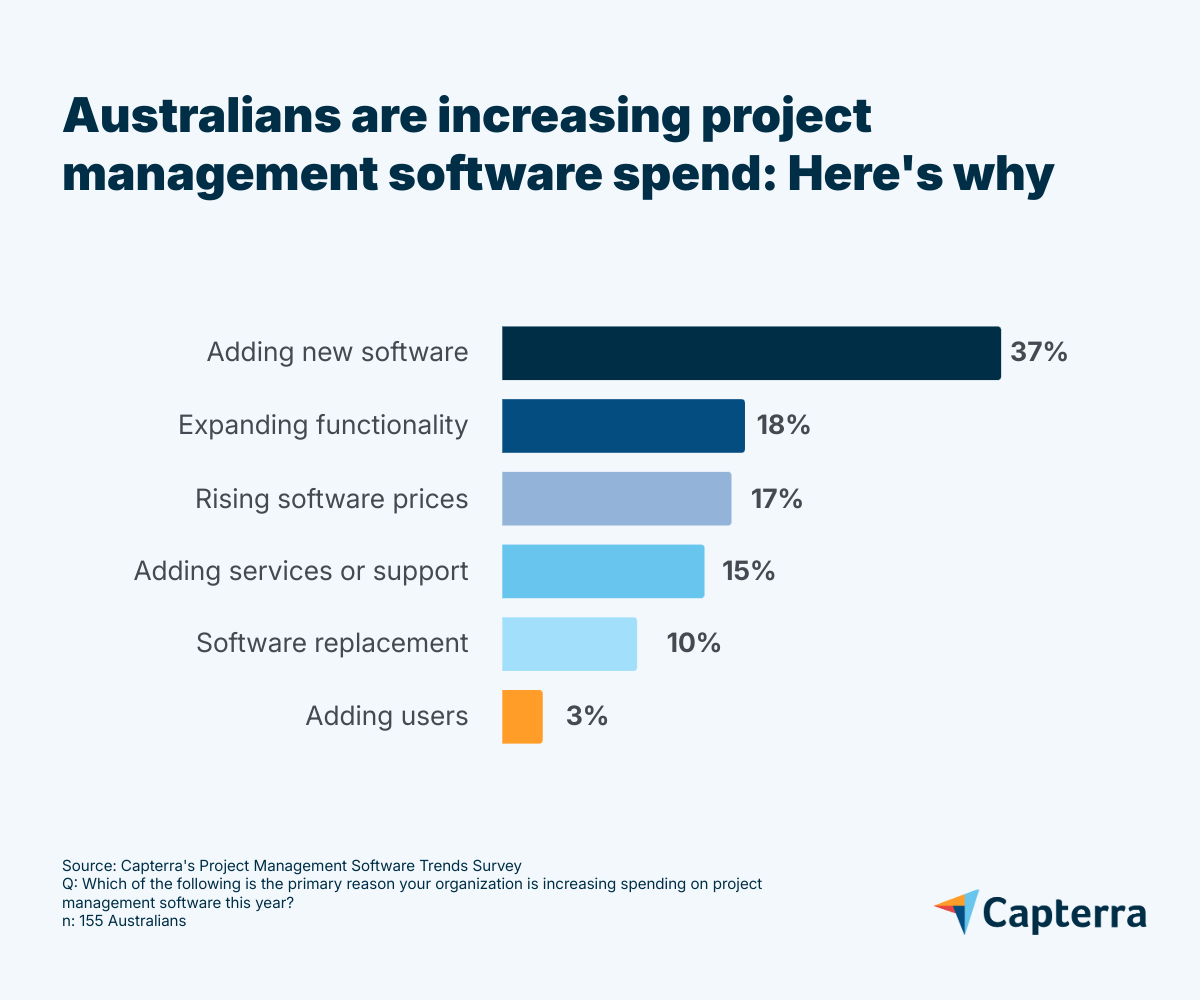
Adding users ranks last, aligning with a widespread move to reduce staffing [2]. Rather than growing teams, businesses are asking current employees to do more with less. For project managers, this means using AI-powered tools to help manage workloads, compensate for limited staffing, and keep projects on track.
“The rapid emergence of complexity has forced us to change the way we think about project management, as it is one of the biggest sources of challenges today.
Modern projects are no longer just about scope, schedule, and budget. They are embedded in messy systems of people, unclear requirements, technology, regulations, changing environments, and shifting expectations,” says Albina.
Why it matters
Projects are bigger and more complex [3]. Mega, and even giga, projects (worth US$1 billion or more) span multiple teams, tools, and time zones. Manual coordination with spreadsheets or offline systems isn’t just inefficient, it’s impossible at this scale.
AI is setting expectations. It’s already proving its value in marketing, finance, and customer service. PM leaders are under pressure to follow suit.
Teams are stretched thin. With fewer people and more work, project managers need help reducing admin tasks, surfacing insights, and prioritising effectively.
The bigger story: adaptability. Businesses face resource constraints, rising complexity, and pressure for long-term efficiency. They’re betting AI can help them do more with fewer people, tighter budgets, and faster timelines.
Expert recommendation
“Understand what must be performed by a human, i.e., human-in-the-loop decision-making, and what can be automated by AI. Just because something can be automated doesn’t mean that it should,” says Albina.
Don’t buy into AI buzzwords in marketing. Not all tools will have the capabilities you need and expect. Focus on tools with practical, transparent features. The right investment can help teams stay competitive, but only if it’s grounded in real business needs.
AI expansion increases the need for software security
As AI expands software’s functionality, it also increases the attack surface, meaning more data, more integrations, and more risk. That’s why security now outranks functionality and AI features as the top priority for project management software buyers.
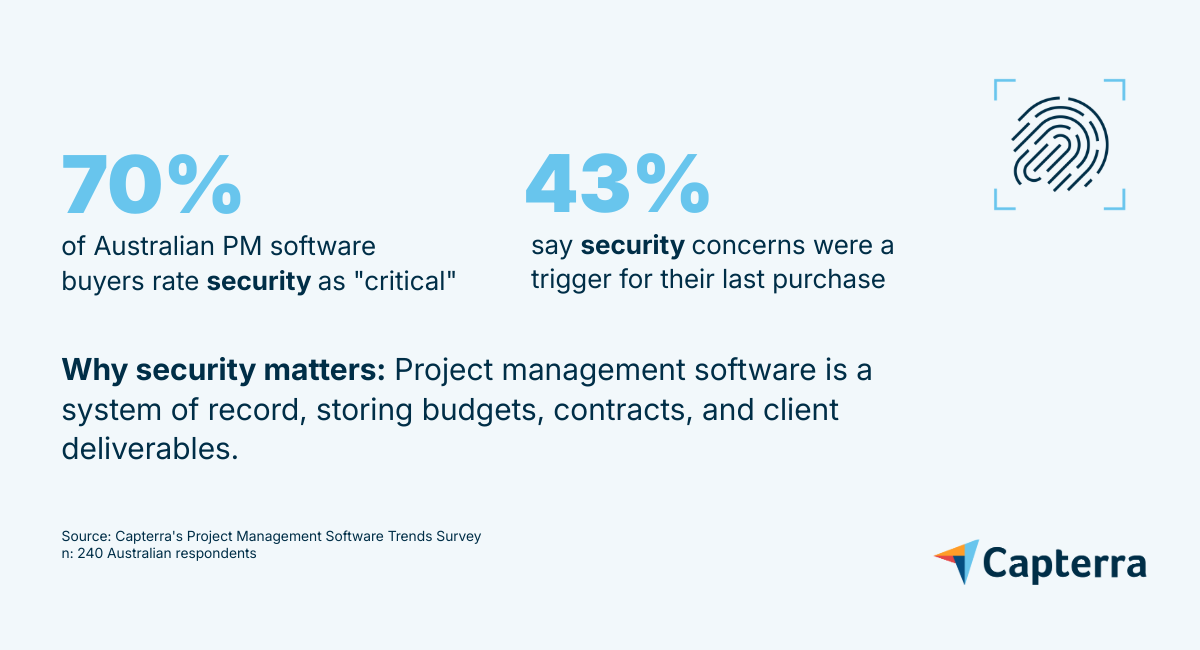
This isn’t surprising: PM software is a system of record that stores sensitive company data such as budgets, contracts, pricing sheets, and client deliverables. And AI adoption raises the stakes even further. Generative AI and predictive analytics require ingesting and processing vast amounts of project data, creating new data flows and integration points that attackers can exploit.
Why security is a source of satisfaction and dissatisfaction
Businesses need encryption, access controls, and audit trails, but they also want ease of use. That tension is hard to resolve, and it’s often why security is one of the major causes of both dissatisfaction and satisfaction for PM software.
Real-world risk: Trello’s 2024 data breach
In July 2024, a hacker known as “Emo” leaked Trello user data on Breach Forums, a well-known cybercrime platform [4]. The data dump revealed the scale of exposure: over 15 million email addresses, along with full names, usernames, profile URLs, board memberships, and account settings. The hacker exploited an insecure API endpoint that allowed unauthenticated users to map email addresses to Trello accounts.
This breach is a stark reminder that project management and collaboration tools are high-value targets for cybercriminals. As PM software becomes more integrated and AI-enhanced, the volume and sensitivity of data flowing through these platforms increase, making weak access controls and poorly secured APIs a major liability.
Expert recommendation
“Adopting the Essential Eight [5] and/or ISO27001 practices [6] provides a good general benchmark for software security; however, if it is not accompanied by a security culture, people will find ways to circumvent the system,” explains Albina.
Scrutinise how vendors secure their APIs, monitor for suspicious activity, and protect user identities. Security must be a top priority, not just a feature, especially in tools that manage sensitive project and personnel data.
Some teams struggle to make the most of AI-powered tools
Buying AI-powered tools is fairly easy. Realising their value is much harder. Three challenges, AI adoption issues, training new users, and integration with existing workflows, are each cited by 40% of respondents as top barriers to getting full value from project management software.
“Most medium to large organisations have an intricate stack of tools. If PM software is not interoperable with these legacy systems, or even with more contemporary systems, there is a high chance of duplication, manual workarounds, risk of errors, loss of data integrity, etc,” says Albina.
Why it matters
Without proper support, even advanced tools go underused. Integration gaps and skill shortages can undermine AI’s potential, leading to inefficiencies instead of improvements. Rapid innovation is outpacing teams’ ability to adapt, and vendors aren’t always bridging the gap.
To help buyers understand what’s slowing AI value realisation, here’s a breakdown of the most common barriers, examples, and what to do about them:
| Barrier to realising AI value | Example | What to do |
|---|---|---|
| Teams lack the skills to use AI features effectively. AI tools require new competencies like interpreting outputs and configuring automations. | A marketing agency ignored predictive scheduling due to a lack of training, reverting to manual planning. | Build AI literacy with role-based training and scenario-based workshops. Focus on practical use cases like task prediction and risk alerts. |
| Onboarding doesn’t support AI feature adoption Failure to guide users through setup leaves teams unaware or underprepared on how to use the new capabilities. | A construction firm didn’t train managers on how to set up workflows, so the firm skipped automation and missed chances to focus on higher-value tasks. | Prioritise role-based training for all end users. Pilot with a small team to test usability before full rollout. |
| AI features don’t fit into existing workflows. New tools often require changes to how teams plan, track, and report work, especially when legacy systems are involved. | A healthcare practice’s AI assistant in their new PM tool couldn’t access legacy CRM data, creating duplicate work. | Audit workflows before implementation. Prioritise tools that integrate with your existing stack and involve users early in rollout. |
Expert recommendation
“Humans define the process, not the other way around. Upskilling is about continual learning, and being open to learning and adaptation will enable iterative improvements that contribute towards creating more meaningful processes, and enable more effective utilisation of AI,” says Albina.
Prioritise products that offer effective onboarding and intuitive design. Build internal training resources to help teams realise AI’s full potential. Ask vendors for role-based training materials and pilot programs.
Using AI tools demands stronger emotional intelligence
AI can generate plans, but it can’t build trust or resolve conflict. That’s why 59% of PMs say they’ve increased their use of emotional intelligence (EQ) since adopting AI.
“As AI automates admin and analytics, the uniquely human skills such as leadership, negotiation, empathy, and systems thinking will define successful PMs and set them apart from their counterparts,” says Albina.
“Emotional intelligence (EI) is a key factor in enabling PMs to navigate collaboration, training, and staffing in AI-enhanced environments. In fact, the need for human skills becomes increasingly important, and it must scale upwards as technology advances.”
Why it matters
AI speeds up workflows, but it doesn’t fix misalignment, tension, or communication gaps. These remain the hardest and most human parts of project management.
What is EI?
Emotional intelligence (EI) is the capacity to identify, understand, and regulate your own emotions and those of others to build trust and alignment. EI helps you blend thinking and feeling to make better choices, rather than reacting on autopilot. High-EI project managers resolve conflicts, strengthen relationships, and keep teams aligned.
Top challenges amplified by AI and how EI helps:
-
Project budget constraints (43%) They listen, reassure, and help teams stay focused when resources are tight.
-
Training new users on adoption and integration issues (40%) They guide with patience and empathy when AI features feel unfamiliar.
-
Unrealistic timelines (34%) They manage expectations to help teams stay calm under pressure.
Expert recommendation “We tend to understand and embrace what and how to do things, but we don’t often stop to reflect on why we do it. AI is great for the ‘what’ and the ‘how’, and to lead effectively, we need to link this back to the ‘why’, which preferably links back to a benefit for people and/or the community,” explains Albina.
Invest in tools that visualise dependencies, manage stakeholder input, and support cross-team alignment. Just as important, provide training in conflict resolution and strategic communication so PMs can lead effectively in AI-enhanced environments.
AI works for project managers, but only when it’s used properly
Project management software is increasingly less about managing task lists and more about enabling adaptability, efficiency, and responsible AI use. Businesses are investing in tools that help them work smarter, grow faster, and adapt to change.
Buyers expect:
- Intelligent automation that saves time without sacrificing control
- Data security to protect sensitive information
- Easy onboarding for faster adoption
- Responsible AI that’s transparent and ethical
Many teams are also moving away from rigid Waterfall or Agile methods toward hybrid approaches. Today, 35% of respondents use hybrid PM methodologies, the most popular choice.
“Traditional Waterfall and pure Agile won’t be enough. PMs will adopt or design their own hybrid frameworks that can flex to shifting conditions—regulation, ESG, digital transformation,” says Albina.
He adds, “AI will help select the best-fit methodology for each project based on complexity, risk, and resources.”
What to watch
- Responsible AI: Vendors must provide transparency and control, not just automation.
- Security-first design: Expect more scrutiny of how tools handle sensitive data.
- Soft skills surge: PMs will need emotional intelligence, negotiation, and strategic thinking to lead in AI-enhanced environments.
- Workflow adaptability: Tools must support hybrid and custom methodologies.
Final recommendation
“Understanding context is key to decision-making, whether as a human or via AI. AI is unable to ‘read between the lines’ of any situation other than what it processes as pure data. Therefore, any short-term decision needs to be made in the context of long-term goals, even if it appears to be counterintuitive from an AI data-driven perspective,” advises Albina.
Choose tools that support human decision-making, balance innovation with execution readiness, and scale with your business goals. The right PM software doesn’t just manage projects, it empowers people.
Recommended reading
Explore how Australian businesses planned for growth, avoided software regret, and prepared for AI adoption in 2025.
Outlines practical steps for assessing your tech stack, identifying underused AI features, and preparing teams for AI adoption. Includes insights from project management coach Peter Taylor.
Explores how Australian PMs are using AI for task automation, predictive analytics, and risk management, and why 95% report positive ROI.
Explores how emotional intelligence helps project managers improve team management, decision-making, and conflict resolution, especially when integrated with PM software.
Methodology
*Capterra’s Project Management (PM) Software Trends Survey was conducted in July 2025 among 2,545 respondents in Australia (n=240), Brazil (n=227), Canada (n=227), France (n=241), Germany (n=224), India (n=216), Italy (n=227), Mexico (n=236), Spain (n=239), the U.K. (n=237), and the U.S. (n=231). The goal of the study was to understand the PM methodologies and software that companies are using, their benefits and challenges, and the impact of AI on project management. Respondents were screened for full-time employment at companies with more than one employee, working in management-level roles or above. Respondents were also confirmed to be at least partially responsible for PM software purchase decisions and operations within their organisation.
Sources
- Patrick Albina, LinkedIn
- What’s Causing Corporate Layoffs?, Knowledge at Wharton
- Megaprojects: Challenges, Opportunities, and the Role of the Project Profession, The Project Management Institute
- Trello Data Breach: Hacker Dumps Personal Info of Millions of Users, HackRead
- Essential Eight Explained, Australian Signals Directorate
- Navigating ISO 27001 in Australia: What You Need to Know and Do, Bastion Security Group